Answer conversations from your AI assistant
Connect Claude Code, Cursor or any assistant that speaks MCP to Grahak. Paste a conversation link and it reads the whole thread and replies as you.
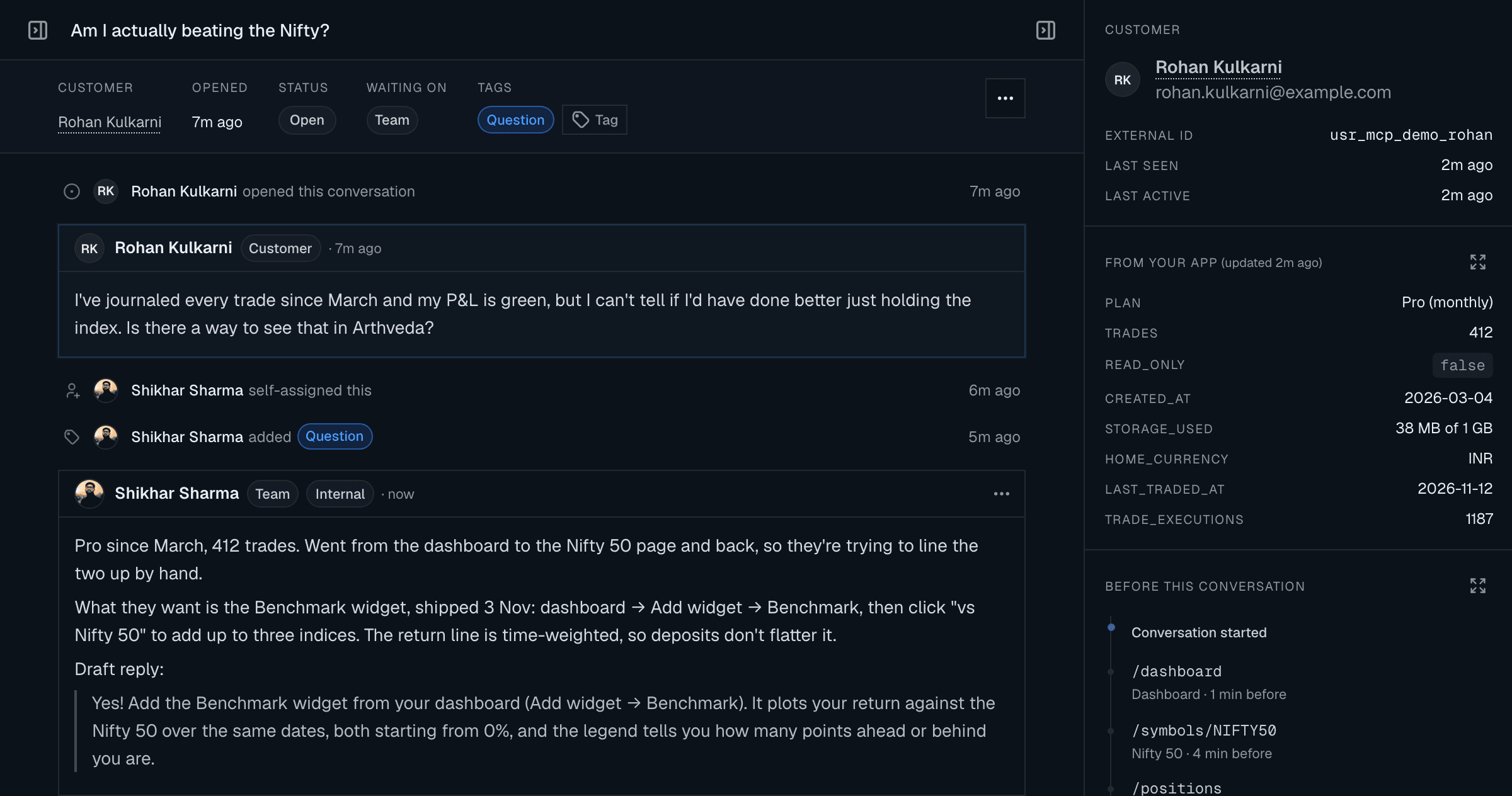
A customer writes in. To answer well you need the thread, who they are, what they were doing when they wrote, and usually the code or the data behind their problem. The inbox has the first three. Your editor, where your AI assistant already lives, has the last one. Now your assistant can have all of it: connect it to Grahak, paste a conversation link, and ask.
Connect it once
- In the console, open the profile menu and pick Connect AI.
- Create an API key. It is shown once, with the setup already filled in for Claude Code, Claude Desktop, Cursor, Codex, Gemini CLI and VS Code.
- For Claude Code that is one command.
--scope usermakes it available in every directory, so it is there in whichever repo you have open when a conversation comes in.
claude mcp add --transport http --scope user grahak https://grahak.dev/api/mcp \
  --header "Authorization: Bearer grahak_sk_…"
Paste a link, ask
Copy a conversation's link from the inbox, paste it into your assistant and ask what you want: “what is this customer stuck on?”, “draft a reply”, “is this the bug we fixed last week?”. It reads:
- The whole thread, every message with its author, and which ones were internal notes.
- The conversation's state: open or closed, who it is waiting on, the assignee and tags.
- The customer, with the details your app sends about them (their plan, their usage, whatever you chose to include).
- The pages they visited before they wrote in.
It can also list a project's inbox (open, waiting on you, assigned to you, unassigned), so “what's waiting on me?” works without a link.
Every reply is your call
The assistant replies as you, and it has to say which kind of reply every time: an internal note your team sees, or a public reply that reaches the customer. There is no default to fall into. Grahak tells it to post publicly only when you asked it to answer the customer, and a client like Claude Code shows you the message and asks before it posts anything. It can also close or reopen a conversation without posting at all.
It sees what you see
The key is yours, not your workspace's. It reaches the projects you can open in the console and nothing else, checked on every call, so if you leave a workspace your key loses it at the same moment. Keys are stored hashed, you can have up to five, and revoking one stops it straight away.
Customer messages are treated as content, never as instructions: every tool that returns them tells the assistant so.
It works on every plan, including the free Sandbox project.
Not yet
claude.ai's web connectors need OAuth, which Grahak doesn't offer yet, so use Claude Code or Claude Desktop for now. Replies from the assistant are text only, no attachments. Questions or a client that misbehaves: hey@ceoshikhar.com.
Reply to Shikhar about "Answer conversations from your AI assistant": a question, what's missing, a bug you hit…